
Kleveroo vs JeopardyLabs — a modern JeopardyLabs alternative
If you're looking for a JeopardyLabs alternative, Kleveroo keeps the part that works — a blank-slate Jeopardy-style board you host on one screen — and adds optional AI generation, a public board library, board themes, and a host view built for projectors, Chromebooks, and phones. Manual boards are unlimited and free. Here's the honest comparison, plus the other alternatives worth checking.
Play a real Kleveroo board
No signup, no credit card — pick a board and host it on a shared screen.
Who Kleveroo is built for
Why people choose Kleveroo
AI-generated boards
Paste a topic or a PDF lesson plan and get a draft board you can edit. Included with Kleveroo Boards from $4.99/month.
Unlimited manual board creation
Build blank-slate 5×5 boards by hand. Unlimited on the free plan, no credit card.
Better hosting tools for live games
Modern host view for projectors, TVs, Chromebooks, and mobile, with built-in timer and answer-reveal hotkeys.
Public board library
Browse, play, and remix free community boards across school subjects, work topics, and party themes.
Premium board themes
Candy, Beach, Western, Arcade, Cyberpunk, Haunted, and more — included with Kleveroo Boards and Kleveroo+.
Designed for desktop and mobile
Create and host games across desktop, tablet, and mobile devices.
What people build on Kleveroo
Looking for a JeopardyLabs alternative?
The short version, before the detailed comparison below.
Kleveroo is a browser-based JeopardyLabs alternative built around the same blank-slate board idea: five categories, five point values, one host running the game on a shared screen. What it adds is optional AI board generation (including from a PDF lesson plan), board themes, a public library of ready-made boards you can play or remix, and a host view designed for projectors, TVs, Chromebooks, and phones — with a built-in timer, answer-reveal hotkeys, team scoring, and automatic played-clue tracking. Manual boards stay unlimited and free.
Why people switch from JeopardyLabs to Kleveroo
Common reasons hosts give — JeopardyLabs is still a solid tool, these are just the gaps Kleveroo fills.
Which should you pick?
Pick JeopardyLabs if you want a simple, familiar manual editor and already rely on its game library. Pick Kleveroo if you also want optional AI drafting from a topic or lesson plan, built-in team scoring and a clue timer, or a library of ready-made boards to host on one shared screen. Both let you build manual boards for free.
Kleveroo vs JeopardyLabs at a glance
Both let you build Jeopardy-style review games. Here's what Kleveroo brings to the table.
Kleveroo
- Unlimited manual board creation on the free plan
- AI board generation (Kleveroo Boards from $4.99/mo)
- Public board library you can browse, play, and remix
- Modern host view for projectors, TVs, Chromebooks, and mobile
- Built-in host controls — timer, answer-reveal hotkeys, team scoreboard
- Premium board themes with Kleveroo Boards or Kleveroo+
JeopardyLabs
- Long-standing free tool with a familiar workflow
- Large established community library of shared games
- Manual editor focused on simple, classic Jeopardy boards
- URL-based sharing model
- Classic host interface
- Popular with many teachers for quick review games
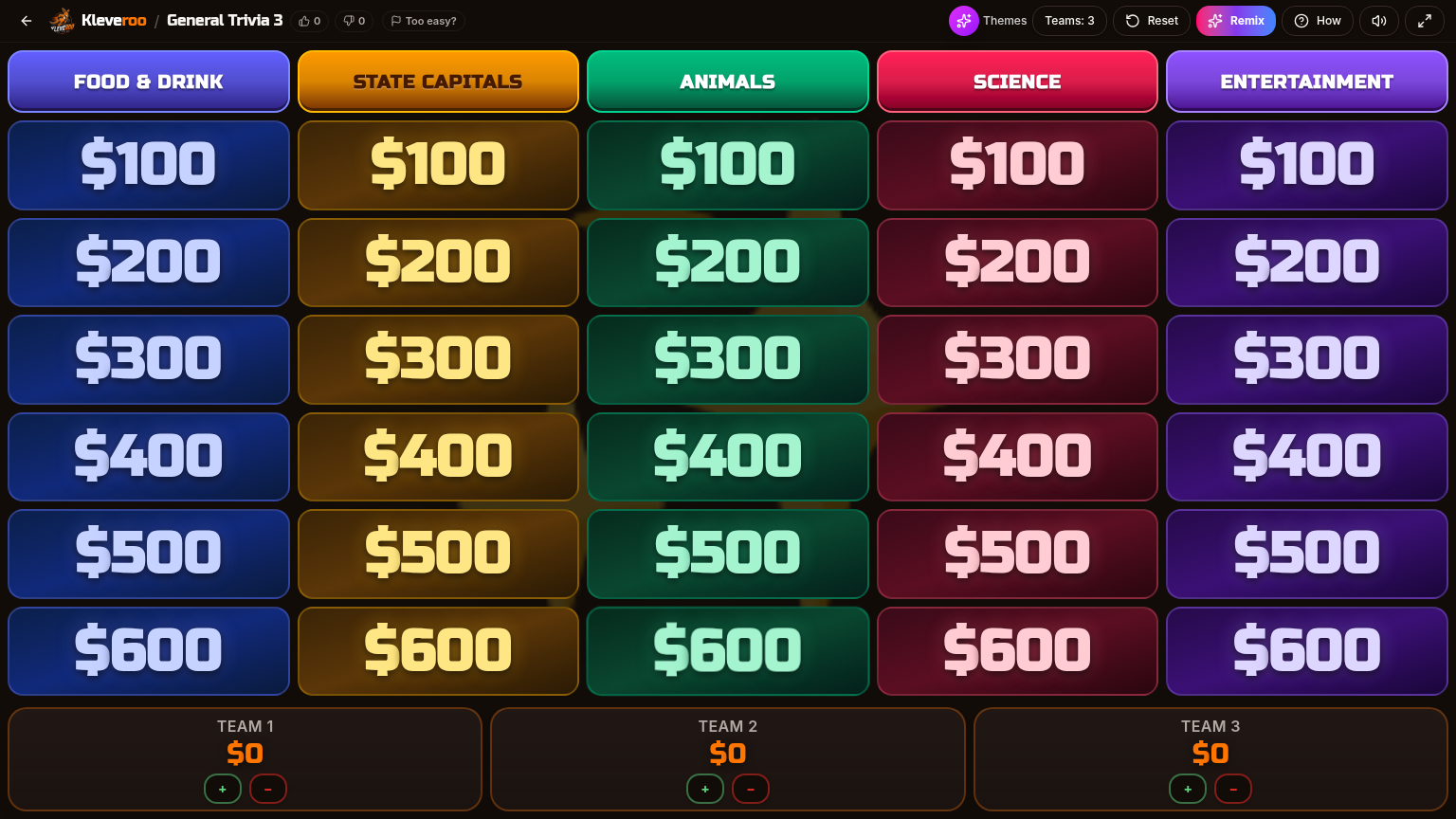
What a Kleveroo board looks like
Five categories across, six rows of point tiles down. Modern host view designed for projectors and Chromebooks. Three team scoreboards sit right under the grid with one-tap +/− scoring.
Feature snapshot
A neutral feature view — verify on each site before committing.
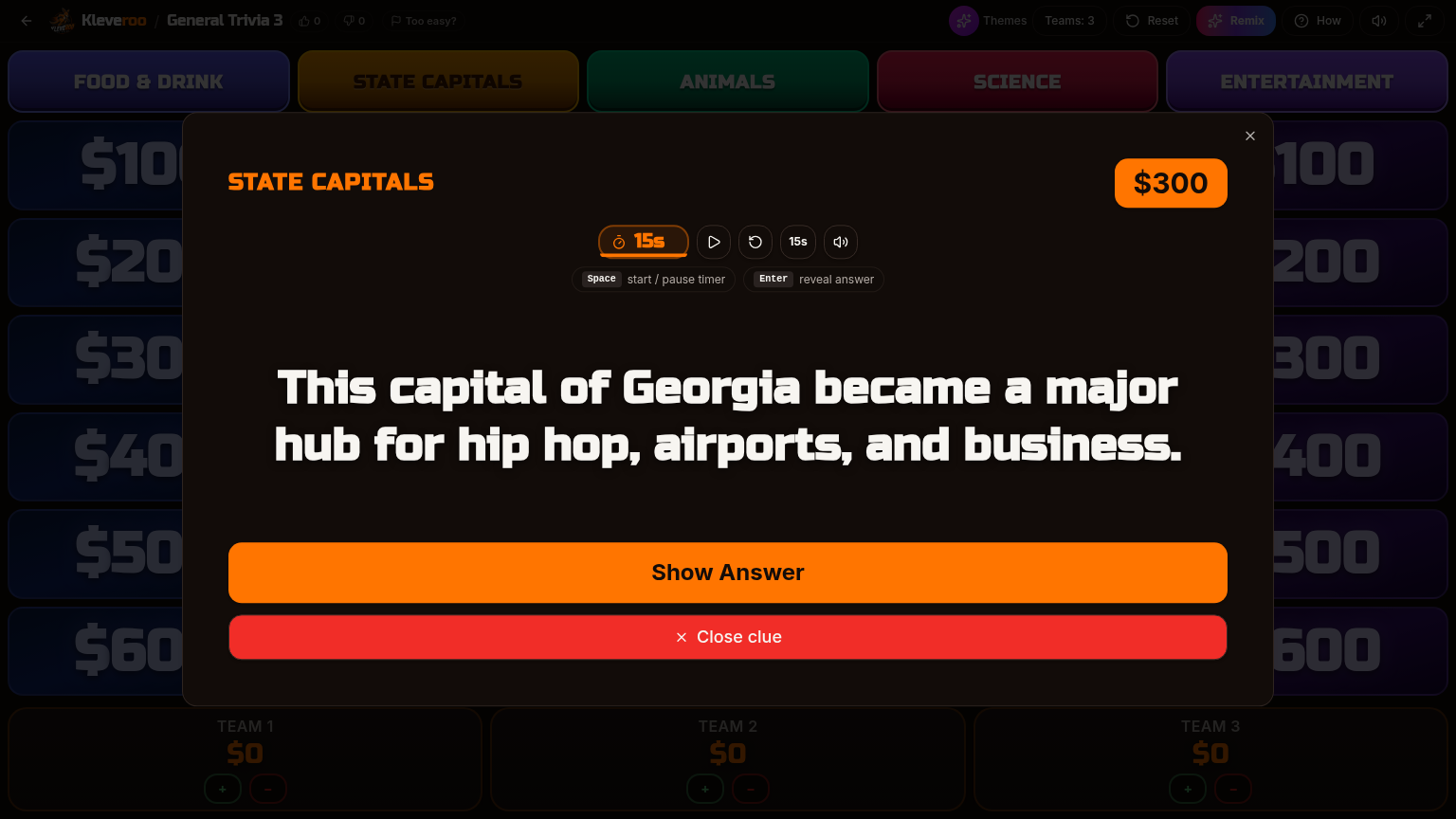
Inside a clue — timer and reveal
Each tile opens a full-screen clue with a built-in countdown timer. Press space to reveal the answer, then award points to the right team. Hotkeys keep the host in flow.
When Kleveroo is the right fit
Both tools are honest choices — here's where Kleveroo tends to stand out.
Pick Kleveroo when…
- You want AI to draft a board from a topic or PDF lesson plan
- You want a modern host view across desktop, TV, Chromebook, and mobile
- You want a public board library to browse and remix
- You want themed visuals (Candy, Beach, Arcade…) with Boards or Plus
- You want built-in hotkeys for timer and answer reveal
Stay with JeopardyLabs when…
- You already have a JeopardyLabs workflow that works well for you
- Your team relies on its established community library
- You prefer the classic editor and URL-sharing model
- You don't need AI, themes, or the broader hosting toolkit
When to build manually and when to use AI on Kleveroo
Both paths are first-class — neither one is the 'real' way to make a board.
Pick the manual builder when…
- You already know the exact clues you want
- You're writing inside jokes, classroom material, or company-specific content
- You enjoy writing the clues — that's the fun part
- You want zero AI involvement, on principle or for accuracy
- You're on the free plan and just want to host a great game
Pick the AI generator when…
- You have a topic but no clues written yet
- You need a playable draft in about a minute
- You want to upload a PDF lesson plan and skip the typing
- You make boards weekly and don't want to start from blank every time
- You're fine reviewing and editing AI output before hosting
Other JeopardyLabs alternatives
Kleveroo isn't the only option worth a look — here's where the other common tools fit.
Factile
Virtual buzzers, AI question generation on its free plan, and a free tier capped at 3 custom games. See how it compares to Kleveroo.
TriviaMaker, Super Teacher Tools, Slides templates & more
A broader ranked comparison of Jeopardy-style game makers, including tools that lean on game-show visuals or slide templates.
PowerPoint & Google Slides templates
Why a browser board beats a downloaded template — and how to move off one.
Kleveroo's manual board maker
The blank-slate builder itself: categories, clues, answers, and point values.
Pricing at a glance
Manual board creation and live hosting are free. Kleveroo Boards starts at $4.99/month and adds AI board generation. Kleveroo+ starts at $9.99/month and unlocks the full premium experience — including premium themes, larger boards, and the wider Kleveroo game library. One-time AI credit packs are also available without a subscription.
Keep exploring
Free Jeopardy game maker
Free forever. Build a 5×5 board by hand.
AI board generator
Paste a topic or PDF and get a draft board you can edit.
Public boards
Browse and play free community boards.
For teachers
Classroom hub, subject boards, and lesson-aligned games.
Kleveroo vs Factile
How Kleveroo compares to Factile.
Best Jeopardy game makers
The full ranked comparison of Jeopardy-style makers and JeopardyLabs alternatives.
Pricing
Free manual boards. Kleveroo Boards from $4.99/mo · Kleveroo+ from $9.99/mo.
More comparison guides
This page is a head-to-head. For a wider list of JeopardyLabs alternatives and who each one suits, see these guides.
JeopardyLabs is stripped down on purpose, and for a lot of people that's the appeal. If you've hit one of its specific limits,…
Read guideThese two tools solve the same problem from opposite directions: one is a free, minimal board you host yourself, the other is a…
Read guideFrequently asked questions
+What is the best alternative to JeopardyLabs?
It depends on what you need. Kleveroo is a good fit if you want unlimited free manual boards plus optional AI generation, a public board library, and a modern host view for projectors and Chromebooks. Factile, TriviaMaker, and Super Teacher Tools are also common alternatives — Factile leans manual-first with a paid AutoGen add-on, TriviaMaker focuses on game-show visuals, and Super Teacher Tools is a lightweight classroom option. Compare them side by side in our guide to Jeopardy game makers.
+Is Kleveroo free?
Yes for the core workflow. Manual board building, saving, and live hosting are free with no board limit and no credit card. Kleveroo Boards is $4.99/month and adds AI board generation plus premium themes; Kleveroo+ is $9.99/month for the full premium experience including larger boards and the premium board library. One-time AI credit packs are available without a subscription.
+How is Kleveroo different from JeopardyLabs?
JeopardyLabs is fully manual with a classic editor and URL-based sharing. Kleveroo keeps the same blank-slate manual builder and adds optional AI board generation (including drafting from a PDF lesson plan), board themes, a browsable public board library, and a host view built for projectors, TVs, Chromebooks, and mobile with a built-in timer, answer-reveal hotkeys, and automatic played-clue tracking.
+Can I make a Jeopardy-style game without PowerPoint?
Yes. Kleveroo runs entirely in the browser — there's no slide deck, no template file, and nothing to download for you or your players. You build the board on a web page and host it fullscreen from the same page.
+Does Kleveroo work for classrooms, work teams, and family game nights?
Yes. The same board format is used for classroom unit review, onboarding and training sessions at work, and family or party game nights. Board Battle is shared-screen and host-led, so a projector, TV, or shared screen is all you need.
+Is Kleveroo a good alternative to JeopardyLabs?
Kleveroo is a strong alternative for teachers, trainers, and teams who want Jeopardy-style games with AI board generation, unlimited manual board creation, a public board library, and modern hosting tools for live games. JeopardyLabs remains a popular, long-standing option — Kleveroo focuses on a more modern platform built around both manual and AI-assisted boards.
+Does Kleveroo have a fully manual, blank-slate builder?
Yes. Kleveroo's manual builder starts from a completely blank 5×5 board. You type every category, clue, answer, and point value yourself. Manual board creation is unlimited and free, with no AI required — it's the default flow for every free user.
+Is Kleveroo's manual builder really free, or is it a trial?
It's free, not a trial. You can build, save, edit, and host unlimited manual boards on a free account. AI generation is a separate paid feature, but you never need it to use the manual builder.
+What makes Kleveroo a modern Jeopardy-style platform?
Kleveroo combines AI-generated boards, unlimited manual board creation, a public board library you can browse and remix, board themes, and live hosting tools designed for projectors, TVs, Chromebooks, and mobile devices.
+Can I import a JeopardyLabs game into Kleveroo?
Not directly. The fastest path is to copy each category and clue into Kleveroo's manual builder. Alternatively, paste your source material into the AI generator and let it draft a Kleveroo board you can edit.
+Can I switch between manual and AI on the same board?
Yes. Generate a draft with AI and then edit every cell by hand, or start manual and use AI to fill in a tricky category. The board format is the same either way.
+How much does Kleveroo cost?
Manual board building and hosting are free. Kleveroo Boards starts at $4.99/month and adds AI board generation plus premium themes. Kleveroo+ starts at $9.99/month and adds the full premium experience including larger boards, the full premium board library, and additional games. One-time AI credit packs are also available without a subscription.
Try a modern JeopardyLabs alternative — free.
Build a blank board, generate one with AI, or browse the public board library.